


Can I connect Outlook, Excel, OneDrive, Teams and Canva to FansaChat?
Short answerYes, with your own free app. For Outlook, Excel, OneDrive and Teams you register an app in Microsoft Azure; for Canva you create a Canva integration, which needs two-step login on your Canva account. You paste the Client ID and secret into the FansaChat chat and connect as usual. One-click sign-in for these apps is not on yet.
Why do I need my own app for Microsoft 365 and Canva?
| App | Status | What you need |
|---|---|---|
| Outlook, Excel, OneDrive, Teams | Works with your own app | An app registration in Microsoft Entra, which needs a Microsoft Entra tenant (a free Azure account creates one) |
| Canva | Works with your own app | A Canva integration, which needs multi-factor authentication on your Canva account |
| One-click sign-in for these apps | Not available | Not on yet, no date |
These apps sign you in through the vendor’s own developer app. Until FansaChat’s own apps are ready for everyone, you create a free one for yourself. It takes about five minutes and the connection stays in your own workspace.
How to do it in FansaChat
You connect inside the app chat. There is no form on this website.
- Describe the workflow, for example “When an email arrives in Outlook, add a row to Excel.”
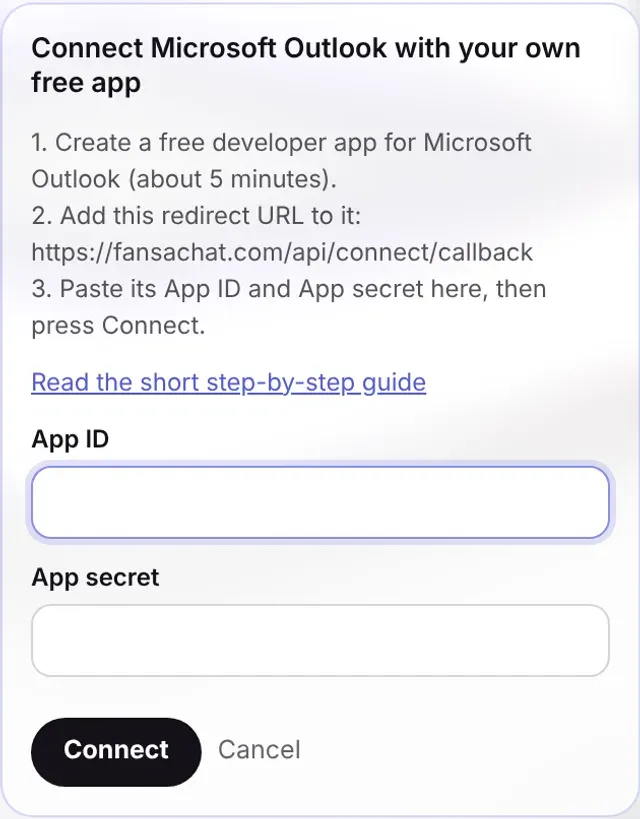
- Press Connect on the Microsoft or Canva step. The chat shows the card “Connect <App> with your own free app”.
- Microsoft 365: in the Azure portal open Microsoft Entra ID, App registrations, New registration. Pick accounts in any organisation and personal accounts, set the redirect type to Web and the URL to
https://fansachat.com/api/connect/callback. Copy the Application (client) ID, then create a Client secret under Certificates & secrets and copy its Value. - Canva: turn on two-step login for your Canva account, open the Canva developer portal, create an integration, add the same redirect URL, and copy the Client ID and a new Client secret.
- Paste the ID and secret into the card and press Connect. The vendor’s window opens; approve and you are done.
Good to know
- Work or school Microsoft accounts may need an administrator to approve the permissions.
- Azure client secrets expire. Note the date, and create a new one before it passes.
- Canva connects with a second step on your Canva account, which is why two-step login has to be on first.
What can I use instead?

Google Sheets and Drive instead of Excel and OneDrive. Both connect today. Open or export the sheet as .xlsx in Excel whenever you need it.

Gmail and Slack instead of Outlook and Teams. Same triggers and messages, one sign-in each.

Placid or Bannerbear instead of Canva. Both generate branded images from a template and connect today.
Sources
- Microsoft Learn: register an application in Microsoft Entra
- Canva developers: creating Connect API integrations (MFA required)
Checked against the vendors’ public documentation on 20 November 2026. Vendors change these rules, so check their page before you start.
Frequently asked questions
Is the Azure app registration free?
Registering an app in Microsoft Entra ID is not a paid step, but you need an account for it: Microsoft’s quickstart asks for a Microsoft Entra tenant and a role that can manage apps. A free Azure account gives you a tenant.
Why does Canva ask for two-step login?
Canva’s developer documentation says multi-factor authentication must be on for your account before you can create an integration. Turn it on in your Canva account settings first.
Can I use one app for Outlook, Excel, OneDrive and Teams?
Usually yes: one Azure app registration can be used for several Microsoft apps. Add each one in the chat when a workflow needs it.
When will one-click sign-in come back?
Soon for the apps we can open without review. We do not have a date, and this page will change when we do.

